
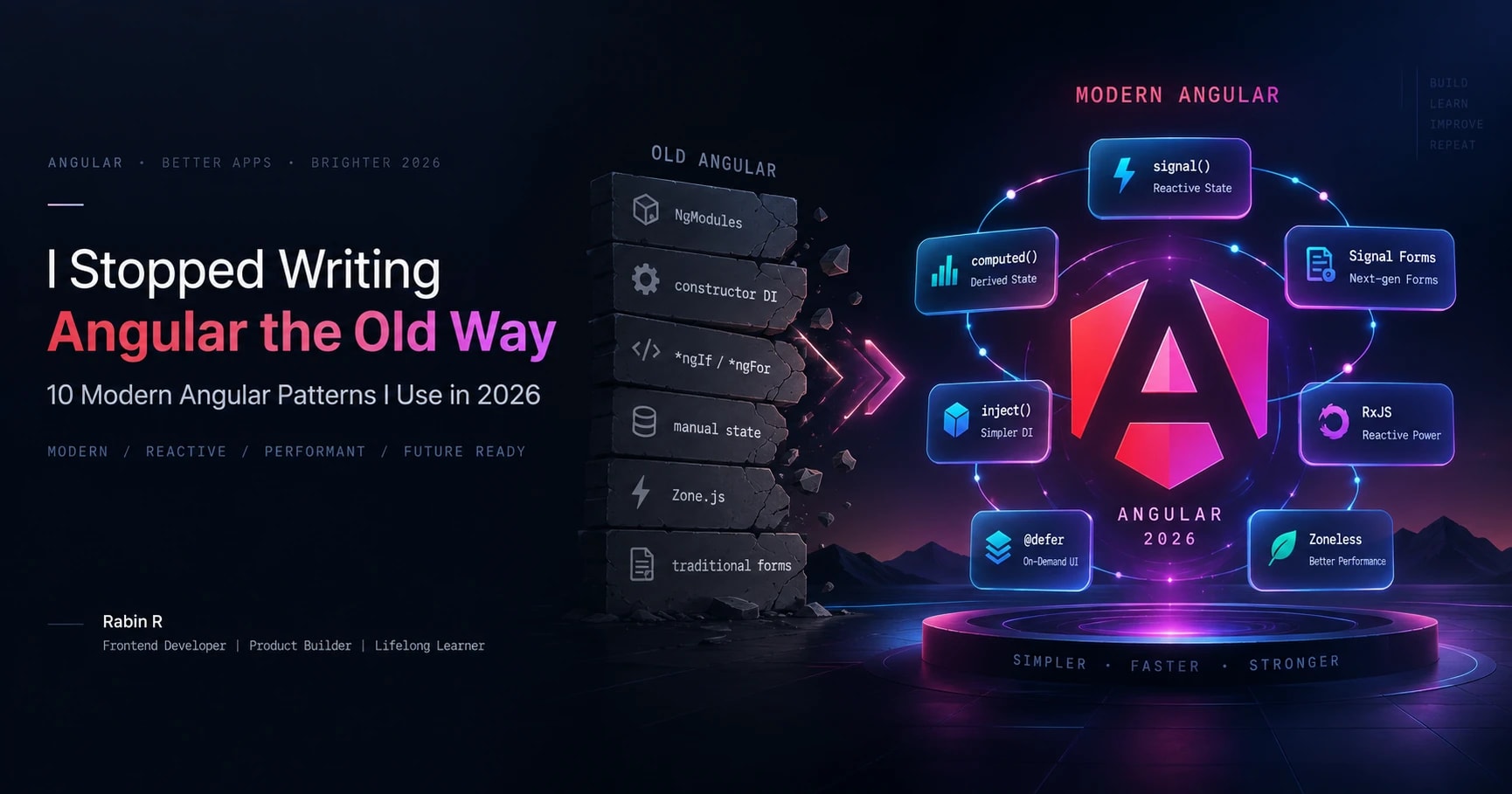
I Stopped Writing Angular the Old Way: 10 Modern Angular Patterns I Use in 2026
The modern Angular patterns I use in 2026, why I use them, and when I would choose something else. A practical guide to clearer state, dependencies, forms, rendering and feature architecture.

Angular has changed significantly.
But the biggest change isn't simply a new API.
It's the way we think about state, dependencies, rendering, forms, performance, and frontend architecture.
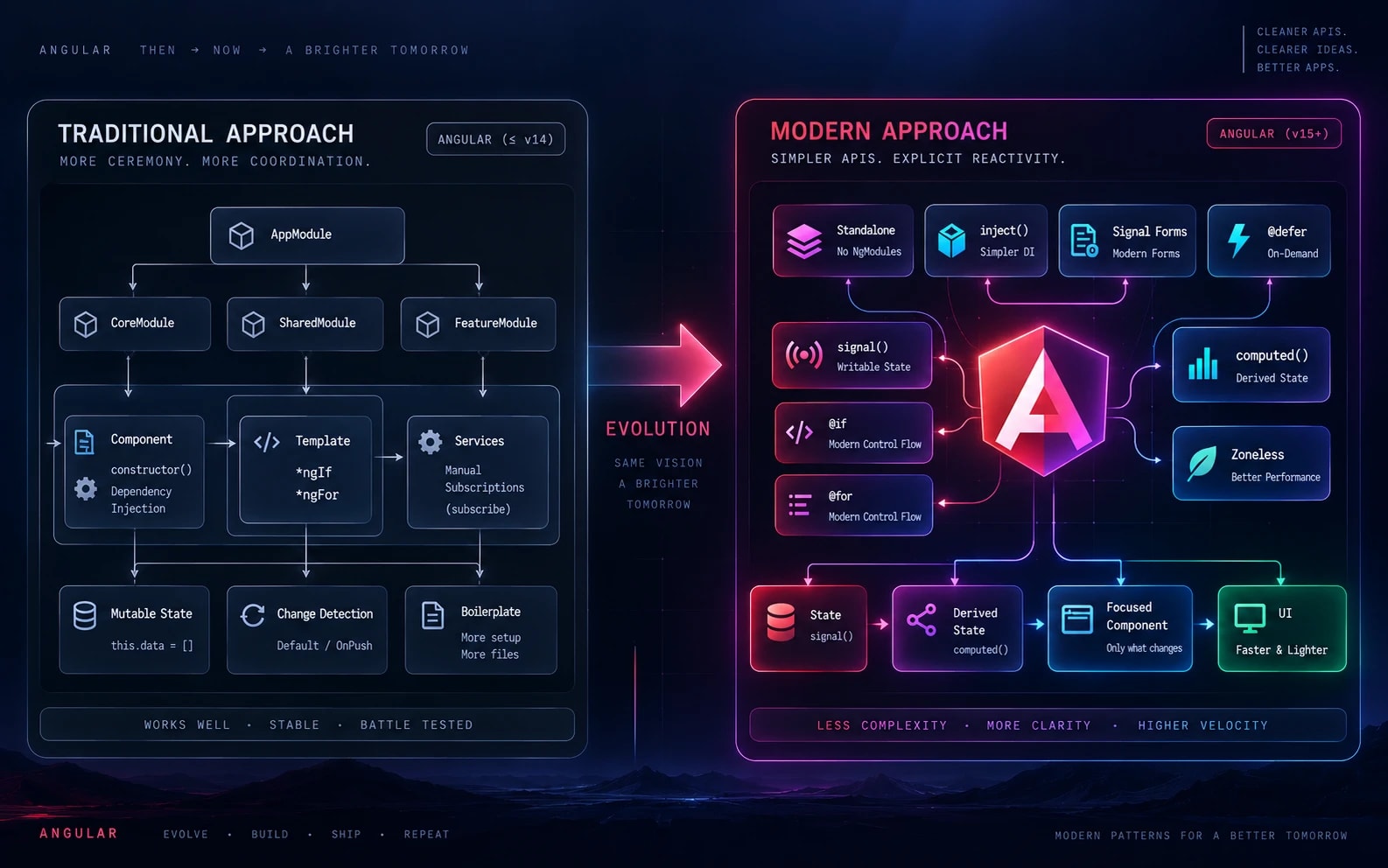
Many Angular applications are still being built with patterns that made sense several years ago:
- NgModules everywhere
- Constructor-heavy dependency injection
- *ngIf and *ngFor
- RxJS for almost every piece of state
- Reactive Forms for every form
- Manual subscriptions
- Zone.js-driven change detection
None of these patterns suddenly became bad.
But modern Angular gives us more focused tools for many of the problems they were solving.
When I build Angular applications today, I try to follow one principle:
That shift has changed not only how my Angular code looks, but also how I approach frontend architecture, reusable components, performance, and maintainability.
In this article, I'll walk through 10 modern Angular patterns I use in 2026 — and, more importantly, explain why I use them and when I wouldn't.
What You'll Learn
By the end of this article, you'll have a practical mental model for:
- Angular Signals and local application state
- computed() and derived state
- inject() and dependency management
- Standalone-first Angular architecture
- Built-in template control flow
- Signal Forms
- Signal-based component inputs
- Signals and RxJS together
- @defer and frontend performance
- Zoneless Angular
- Feature boundaries and reusable UI architecture
Modern Angular Architecture at a Glance
Before looking at individual APIs, here's the mental model I use when designing a modern Angular application:
                          MODERN ANGULAR
                                │
              ┌─────────────────┼─────────────────┐
              │                 │                 │
            STATE             EVENTS          RENDERING
              │                 │                 │
          Signals             RxJS             @defer
              │                 │                 │
         computed()       HTTP / Streams       Priority
              │                 │                 │
              └─────────────────┼─────────────────┘
                                │
                       FEATURE ARCHITECTURE
                                │
                    Standalone + Clear Boundaries
                                │
                                ▼
                       Maintainable UI
The important part isn't using every API.
It's understanding which abstraction should own which responsibility.
1. Angular Signals for Local Application State
One of the biggest changes in my Angular code is simple:
I don't automatically reach for an Observable every time a value can change.
Consider a basic counter:
loading = false;
count = 0;
These values work perfectly well as properties.
But once other parts of the UI depend on them, we need a clear reactive relationship.
Signals make that relationship explicit.
import { computed, signal } from '@angular/core';

count = signal(0);

doubledCount = computed(() => this.count() * 2);

increment() {
  this.count.update(value => value + 1);
}
Now the architecture is easy to understand:
count
  ↓
signal()
  ↓
computed()
  ↓
UI
count is the source of truth.
doubledCount derives from that source.
When count changes, Angular can react to the relevant dependency.
The important improvement isn't simply shorter code.
It's explicit dependency management.
My Current Mental Model
Signals
   ↓
Synchronous application / UI state

computed()
   ↓
Derived state

RxJS
   ↓
Asynchronous streams and event composition
Signals didn't make RxJS obsolete.
They made me more intentional about when I actually need RxJS.
When I Use Signals
I generally use Signals when the state is:
- synchronous
- directly consumed by the UI
- local to a component or feature
- easy to represent as reactive state
When I Don't
I don't use Signals simply because they're newer.
If I'm dealing with complex asynchronous streams, event composition, cancellation, debouncing, or stream transformations, RxJS may still be the clearer abstraction.
My Rule
2. Angular computed() for Derived State
One frontend problem that looks harmless can create difficult bugs later:
storing values that can already be calculated.
Imagine:
firstName = signal('Rabin');
lastName = signal('R');

fullName = signal('');
Now fullName needs to stay synchronized whenever either source changes.
But fullName isn't really independent state.
It's a calculation.
So I prefer:
firstName = signal('Rabin');
lastName = signal('R');

fullName = computed(
  () => `${this.firstName()} ${this.lastName()}`
);
Now there is only one direction of data flow:
firstName ──┐
            ├──→ computed() ──→ fullName
lastName ───┘
There is:
- no manual synchronization
- no second mutable source of truth
- less opportunity for inconsistent state
This has become one of my most useful frontend rules:
When I Use computed()
Use it for things like:
- filtered lists
- display labels
- calculated totals
- UI visibility
- derived permissions
- formatted values
- combined state
For example:
products = signal<Product[]>([]);

activeProducts = computed(() =>
  this.products().filter(product => product.active)
);
Instead of manually maintaining both products and activeProducts, the relationship stays explicit.
3. inject() for Cleaner Angular Dependency Injection
Traditional Angular dependency injection usually looks like this:
constructor(
  private userService: UserService,
  private router: Router,
  private analytics: AnalyticsService
) {}
This is still understandable and valid.
But in modern Angular code, I increasingly prefer:
private readonly userService = inject(UserService);
private readonly router = inject(Router);
private readonly analytics = inject(AnalyticsService);
Why?
Because dependencies stay close to where the class fields are defined.
The constructor remains available for actual initialization logic.
And inject() works naturally with Angular's increasingly functional APIs.
For example:
export const canAccessDashboard = () => {
  const auth = inject(AuthService);
  const router = inject(Router);

  return auth.isAuthenticated()
    ? true
    : router.createUrlTree(['/login']);
};
The difference may look small inside one component.
Across a large codebase, however, these small reductions in ceremony can make the architecture easier to scan.
When I Use inject()
I particularly like it when working with:
- functional guards
- interceptors
- providers
- standalone APIs
- functional configuration
- components with several dependencies
I don't use it simply because it's newer.
I use it where it makes dependencies and composition clearer.
4. Standalone-First Angular Architecture
Older Angular architecture often started with:
My preferred question today is:
A standalone component makes that relationship easier to see.
@Component({
  selector: 'app-user-card',
  standalone: true,
  imports: [
    DatePipe,
    AvatarComponent
  ],
  templateUrl: './user-card.html'
})
export class UserCardComponent {}
The component explicitly declares what it needs.
This also influences how I structure applications.
Instead of organizing everything around technical file types, I prefer keeping related functionality together.
src/
└── app/
    ├── features/
    │   ├── users/
    │   │   ├── pages/
    │   │   ├── components/
    │   │   ├── services/
    │   │   └── models/
    │   │
    │   └── dashboard/
    │       ├── pages/
    │       ├── components/
    │       └── data-access/
    │
    └── shared/
        ├── ui/
        └── utilities/
The exact folder names aren't the important part.
Clear ownership is.
One mistake I've seen in frontend projects is allowing shared/ to slowly become a place where everything goes.
Eventually, nobody knows which feature owns which responsibility.
Standalone-first architecture works best when it's combined with strong feature boundaries.
Feature Ownership
A good feature should make it easy to answer:
- Who owns this state?
- Who owns this API logic?
- Which components belong to this feature?
- Which UI is genuinely reusable?
- What should remain private to the feature?
That is more important than having the perfect folder structure.
5. Angular Built-In Control Flow
Angular templates have also become easier to read.
Previously, a list with an empty state might look like:
<div *ngIf="users.length; else empty">
  <div *ngFor="let user of users">
    {{ user.name }}
  </div>
</div>

<ng-template #empty>
  <p>No users found.</p>
</ng-template>
Today I prefer:
@if (users().length) {

  @for (user of users(); track user.id) {
    <app-user-card [user]="user" />
  } @empty {
    <p>No users found.</p>
  }

}
Angular's built-in control flow gives us:
@if
@else
@for
@empty
@switch
@case
The benefit isn't simply replacing *ngIf with @if.
The template now communicates its control flow more directly.
I especially like:
@for (user of users(); track user.id) {
  <app-user-card [user]="user" />
}
because identity tracking is visible directly where the iteration happens.
Good templates should tell a story about the UI without forcing another developer to mentally reconstruct the control flow.
6. Angular Signal Forms for Signal-First Form State
Forms are one of the interesting areas of modern Angular.
For years, many Angular applications have been structured around this mental model:
FormGroup
    ↓
FormControl
    ↓
Validators
    ↓
valueChanges
    ↓
Template
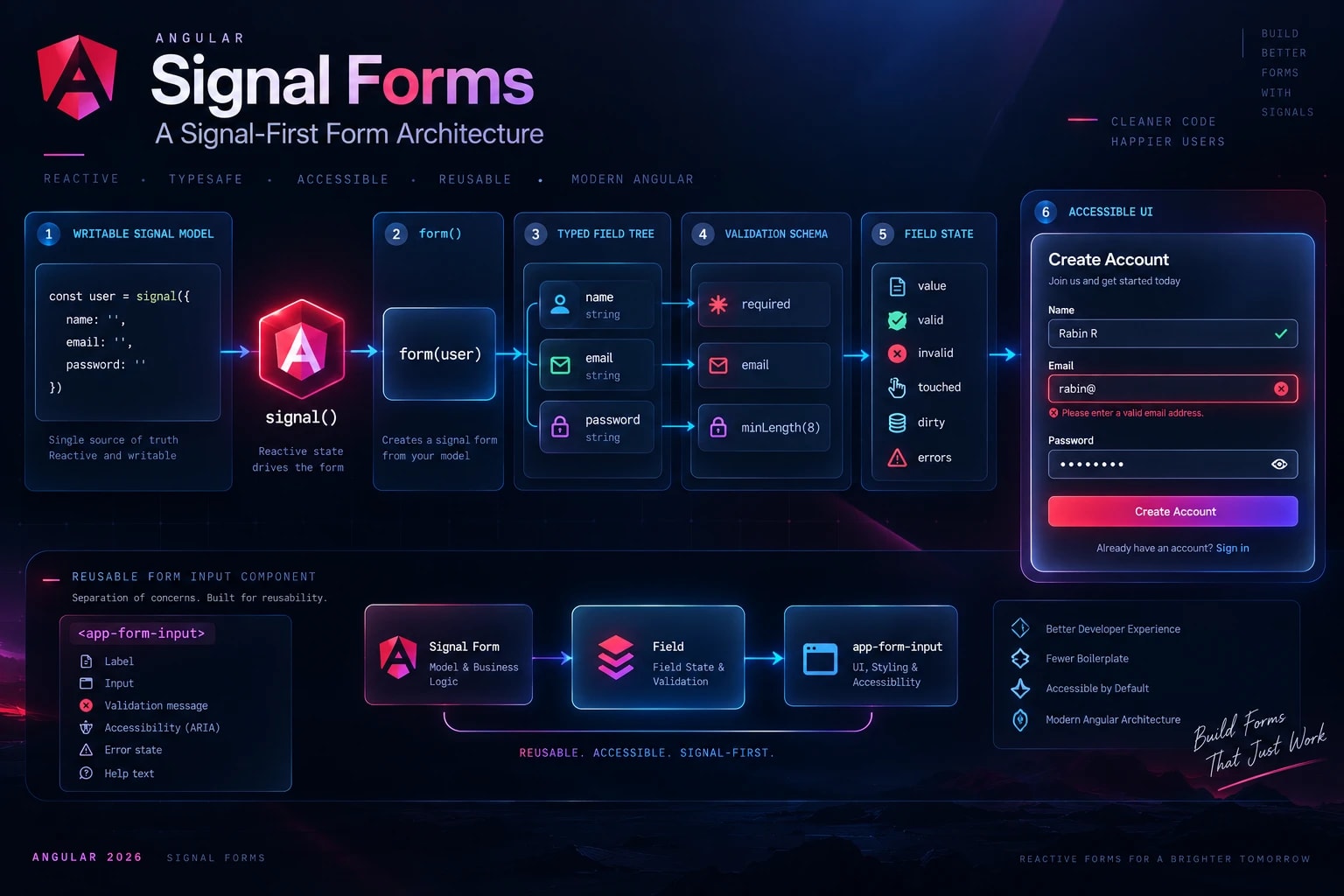
Signal Forms introduce a different way to think about the problem:
Writable Signal Model
        ↓
      form()
        ↓
    Field Tree
        ↓
Validation Schema
        ↓
    Field State
        ↓
       UI
The difference is important.
The data model becomes the starting point.
Building a Registration Form
Imagine I'm creating a simple account registration experience.
First, I define the model:
interface RegisterModel {
  name: string;
  email: string;
  password: string;
}
Then the form data exists as signal state:
registerModel = signal<RegisterModel>({
  name: '',
  email: '',
  password: ''
});
The model is easy to understand.
No UI concerns.
No validation messages.
Just application data.
Then I build the form around it:
registerForm = form(this.registerModel, path => {
  required(path.name, {
    message: 'Name is required'
  });

  required(path.email, {
    message: 'Email is required'
  });

  email(path.email, {
    message: 'Enter a valid email address'
  });

  required(path.password, {
    message: 'Password is required'
  });

  minLength(path.password, 8, {
    message: 'Password must contain at least 8 characters'
  });
});
Now validation belongs to the form schema while the model remains clean.
The template can bind directly to the field:
<label for="email">
  Email
</label>

<input
  id="email"
  type="email"
  [formField]="registerForm.email"
/>

@if (
  registerForm.email().touched() &&
  registerForm.email().invalid()
) {
  <div
    class="error"
    role="alert"
  >
    @for (
      error of registerForm.email().errors();
      track error.kind
    ) {
      <p>{{ error.message }}</p>
    }
  </div>
}
The architecture becomes:
Model
  ↓
Signal
  ↓
Signal Form
  ↓
Validation
  ↓
Field State
  ↓
UI
That feels natural in an application already designed around Signals.
Reusable Signal Form Controls
This becomes even more interesting when building a reusable design system.
Instead of repeating labels, validation rendering, and accessibility logic everywhere, I can build something like:
<app-form-input
  label="Email"
  type="email"
  [field]="registerForm.email"
/>
The reusable component can handle:
- label rendering
- error presentation
- required indicators
- accessibility attributes
- consistent spacing
- input styling
The parent form still owns:
- the data model
- validation rules
- business logic
- submission behavior
That separation is important.
A reusable form component shouldn't need to understand the entire business form.
It should understand how to present a field correctly.
Would I Migrate Every Reactive Form?
No.
A mature production application with stable Reactive Forms doesn't automatically need a rewrite.
I prefer Signal Forms when their model fits the architecture I'm building, particularly for new signal-first functionality.
My rule is simple:
7. Signal Inputs and Reactive Component State
Component inputs are another place where Angular's reactive model becomes useful.
Instead of treating an input as a property that happens to change, I can model it as reactive state:
user = input.required<User>();

displayName = computed(() => {
  const user = this.user();

  return `${user.firstName} ${user.lastName}`;
});
The dependency is clear:
Parent
  ↓
input()
  ↓
computed()
  ↓
Template
If the input changes, the derived value follows that relationship.
I don't need to manually synchronize another property.
This is the same principle we saw earlier with computed():
That principle scales surprisingly well.
A Useful Component Pattern
For reusable components, I try to keep the relationship simple:
Input
  ↓
Derived State
  ↓
Presentation
Business logic shouldn't leak into every reusable UI component.
8. Angular Signals and RxJS Together
Whenever Signals are discussed, one question appears quickly:
I don't think that's the most useful question.
They're good at different things.
Imagine I'm building a search experience.
The search text may naturally exist as UI state.
But network behavior can involve:
User Input
    ↓
Debounce
    ↓
Cancel Previous Request
    ↓
Latest HTTP Request
    ↓
Response
    ↓
Update UI
That's a stream problem.
RxJS is excellent at it.
For example, the application may need:
- debounceTime
- distinctUntilChanged
- switchMap
- cancellation
- error handling
- stream composition
Trying to eliminate RxJS from this problem simply because Signals exist doesn't automatically make the implementation better.
My mental model is:
LOCAL UI STATE
      ↓
   Signals


DERIVED STATE
      ↓
   computed()


EVENTS / ASYNC STREAMS
      ↓
      RxJS


SERVER COMMUNICATION
      ↓
 HTTP / async data layer
Then these tools can meet at sensible boundaries.
For example:
Search Input
    ↓
Signal
    ↓
RxJS Search Pipeline
    ↓
HTTP
    ↓
Result State
    ↓
computed()
    ↓
UI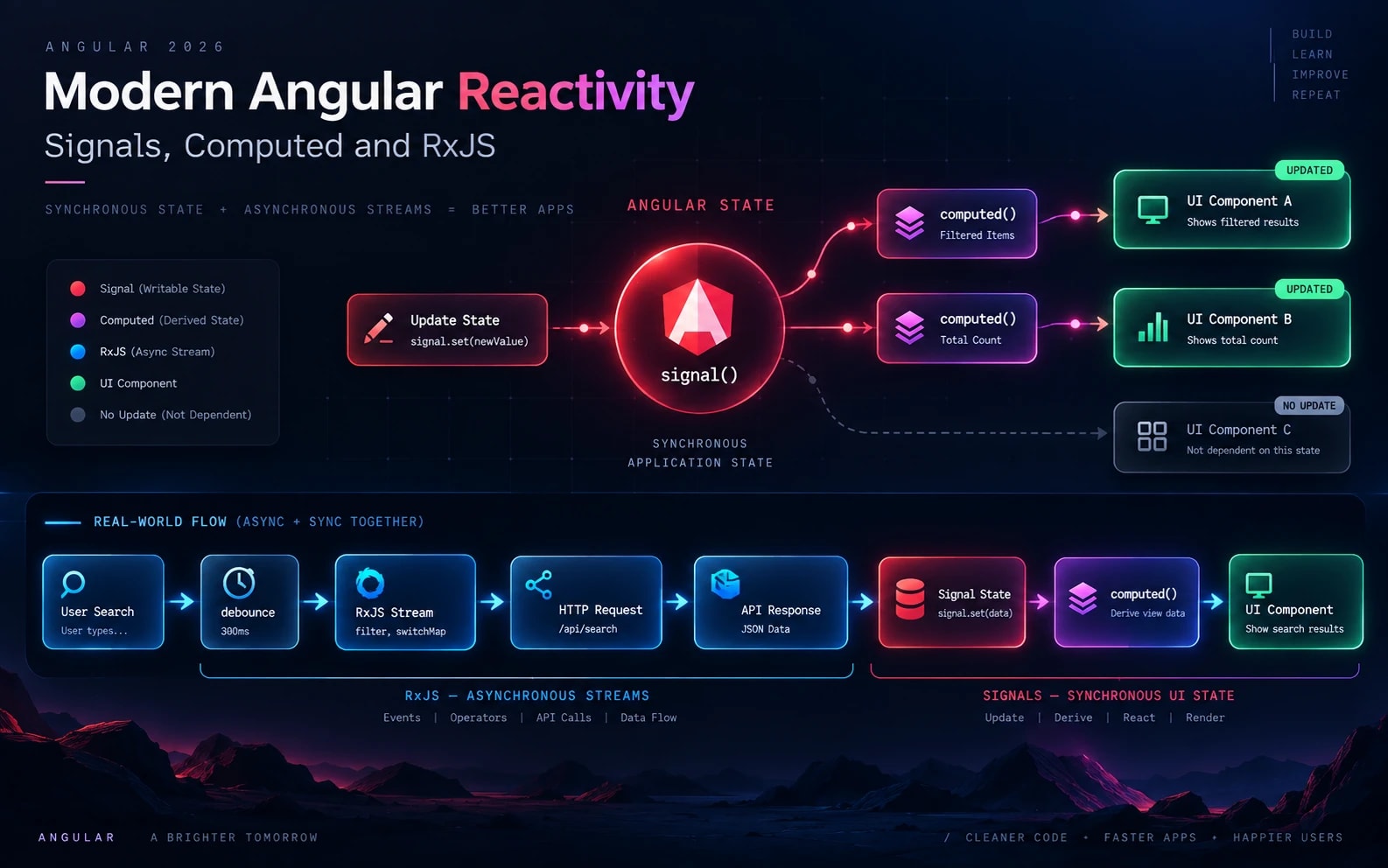
The goal isn't:
The goal is:
This approach also helps when thinking about duplicate API requests and shared data flows in larger Angular applications.
Related Reading
→ Angular Signals for State Management → RxJS: Reducing Duplicate API Calls
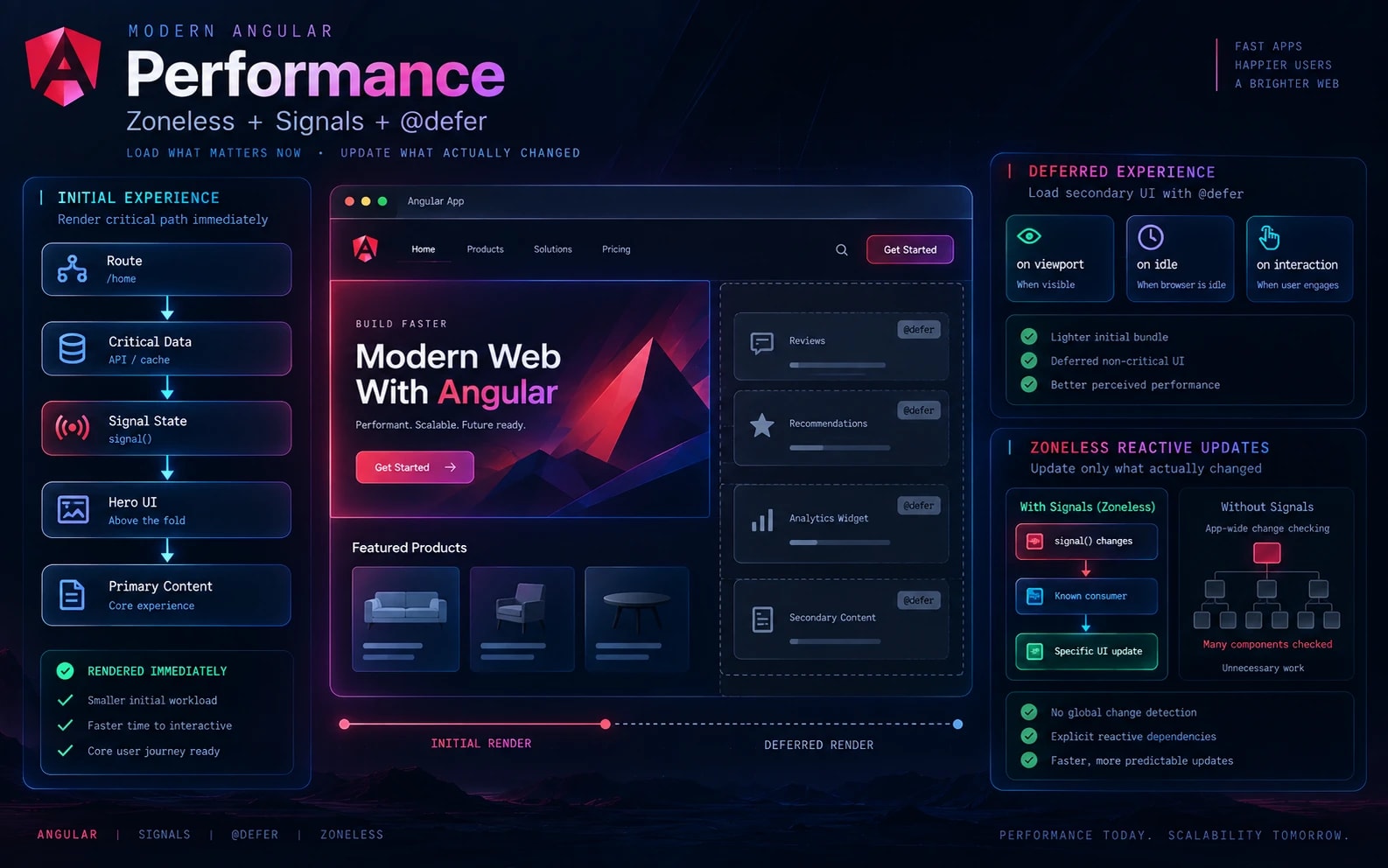
9. Angular @defer: Sometimes the Fastest Code Is Code We Haven't Loaded Yet
Performance discussions often focus on:
- reducing execution time
- optimizing loops
- reducing unnecessary rendering
- caching
- bundle size
Those things matter.
But another question can be even more valuable:
Imagine a product page containing:
Product Information
Reviews
Recommendations
Analytics Widget
Related Products
Secondary Content
The user probably needs the product information immediately.
They probably don't need every review and recommendation before the first useful screen appears.
That's where @defer becomes interesting.
<app-product-details />

@defer (on viewport) {
  <app-reviews />
} @placeholder {
  <app-review-skeleton />
}

@defer (on idle) {
  <app-recommendations />
}
Now the rendering strategy reflects user priority:
INITIAL

Critical Content
      ↓
 Render Now


SECONDARY

Reviews
Recommendations
Other Widgets
      ↓
    Defer
      ↓
Load When Needed
This changes the performance question.
Instead of only asking:
I also ask:
That's an architectural performance decision, not just a micro-optimization.
My Rule for @defer
Don't defer something simply because you can.
Ask:
- Is it required for the first useful screen?
- Is it below the fold?
- Can the user interact without it?
- Can a meaningful placeholder be shown?
- Does delaying it improve the initial experience?
Performance is often about timing, not just speed.
10. Designing Angular Applications for Zoneless Change Detection
Zone.js has historically played an important role in Angular change detection.
Modern Angular's reactive APIs allow us to be increasingly explicit about what changed.
Consider:
count = signal(0);

increment() {
  this.count.update(value => value + 1);
}
The signal itself communicates that state has changed.
Conceptually, we're moving away from thinking only in terms of:
Something happened
       ↓
Check broadly for changes
       ↓
Find what needs updating
toward a more explicit reactive model:
State changed
      ↓
Known dependency reacts
      ↓
Relevant UI updates
This is why I think Signals and zoneless Angular are particularly interesting together.
It's not simply about removing Zone.js.
It's about designing applications where reactive dependencies are easier to understand.
That can contribute to a more predictable mental model for application state and rendering.
Designing for Explicit Reactivity
When building with this mindset, I pay more attention to:
- clear state ownership
- explicit reactive dependencies
- derived state
- focused components
- predictable data flow
- avoiding unnecessary synchronization
Zoneless thinking is therefore more than a configuration decision.
It can influence how the application is architected.
What Actually Changed in My Angular Code?
Looking at all these APIs separately can make modern Angular seem like a collection of syntax changes.
I don't think that's the important part.
The bigger change is architectural.
My Older Mental Model
Component
 ├── State
 ├── Subscriptions
 ├── Form Setup
 ├── Derived Values
 ├── Change Coordination
 ├── API Logic
 └── Template Logic
One component could slowly become responsible for everything.
My Preferred Direction Today
Source State
     ↓
Signals / Streams
     ↓
Derived State
     ↓
Focused Feature Logic
     ↓
Focused Components
     ↓
UI
The responsibilities become easier to explain.
Signals manage reactive state.
computed() describes derived state.
RxJS handles asynchronous streams and event composition.
Signal Forms model signal-first form state.
Standalone APIs make dependencies clearer.
Built-in control flow simplifies templates.
@defer controls when non-critical UI work happens.
Zoneless patterns encourage more explicit reactive dependencies.
This is the part of modern Angular I find most valuable.
Not shorter syntax.
Clearer responsibility.
What I Don't Do
Using modern Angular doesn't mean replacing everything with the newest API.
I don't:
- replace RxJS with Signals when the problem is genuinely a stream
- migrate stable Reactive Forms simply because Signal Forms exist
- create dozens of tiny components simply so the architecture looks "modular"
- use effect() where computed() can represent the relationship
- defer UI that users actually need immediately
- adopt an API simply because it's new
Because:
Clear boundaries do.
Good state ownership does.
Predictable data flow does.
Maintainability does.
My Modern Angular Decision Guide
When I'm deciding which Angular tool to use, this is the mental model I currently follow:
Is it synchronous application state?
        ↓
      Signal


Can it be calculated from existing state?
        ↓
    computed()


Is it an asynchronous stream or event sequence?
        ↓
      RxJS


Is it a signal-first form?
        ↓
   Signal Forms


Is the component non-critical initially?
        ↓
     @defer


Can the feature own its dependencies directly?
        ↓
Standalone Architecture


Do I need explicit reactive rendering?
        ↓
Signals + Zoneless
This isn't a rulebook.
It's a way to avoid reaching for the same abstraction for every problem.
From Modern Angular Features to Production Architecture
The real challenge isn't learning what signal(), @defer, inject() or Signal Forms do.
Documentation can teach us the syntax.
The harder questions are:
Where should state live?
Which values should be derived?
When should RxJS own the flow?
What should become reusable?
Where should API data be shared?
Which UI should be loaded immediately?
What belongs to a feature versus the shared layer?
How do we make all of this understandable to the next developer?
Those decisions determine whether an Angular application remains maintainable as it grows.
That's why I don't think of these as simply "10 Angular features."
I think of them as tools for building a clearer frontend architecture.
A Practical Modern Angular Architecture
Putting everything together, a production-oriented feature can look conceptually like this:
                    FEATURE
                       │
        ┌──────────────┼──────────────┐
        │              │              │
      State          Data           UI
        │              │              │
    Signals          RxJS        Components
        │              │              │
   computed()         HTTP        Inputs
        │              │              │
        └──────────────┼──────────────┘
                       │
                  Feature Page
                       │
                       ▼
                       UI
And at the application level:
src/
└── app/
    ├── core/
    │   ├── auth/
    │   ├── http/
    │   └── routing/
    │
    ├── features/
    │   ├── users/
    │   ├── dashboard/
    │   ├── products/
    │   └── settings/
    │
    ├── shared/
    │   ├── ui/
    │   ├── forms/
    │   └── utilities/
    │
    └── app.config.ts
The exact architecture will vary by application.
The important thing is that responsibilities remain understandable.
Modern Angular Checklist
Before I consider an Angular feature complete, I like asking:
State
- Is the source of truth obvious?
- Am I storing derived state unnecessarily?
- Should this state be a Signal?
Async
- Is this genuinely a stream?
- Do I need RxJS operators such as switchMap or debounceTime?
- Am I creating duplicate requests?
Components
- Does this component have a clear responsibility?
- Are its dependencies obvious?
- Could it own its dependencies directly?
Forms
- Is the form model separate from presentation?
- Are validation rules easy to understand?
- Can reusable field components handle presentation consistently?
Performance
- Does this UI need to load immediately?
- Could @defer be appropriate?
- Am I optimizing something users actually experience?
Architecture
- Does the feature own its state?
- Is shared/ becoming a dumping ground?
- Can another developer understand the data flow quickly?
Final Thought
Modern Angular isn't simply about learning new APIs.
It's about making better decisions about:
State. Dependencies. Data flow. Rendering. Performance. Component boundaries.
Signals, computed(), RxJS, Signal Forms, standalone APIs, @defer, and zoneless patterns are tools.
The real skill is knowing where each tool belongs.
That's the difference between simply using modern Angular features and actually building modern Angular applications.
I'm continuing to document the frontend architecture patterns, performance techniques, reusable UI approaches, and engineering decisions I use when building frontend applications.
Continue Exploring Angular
If you're exploring modern Angular architecture, these are the next topics I'd recommend reading:
Angular Signals for State Management
How I think about reactive state, derived values, and state ownership.
→ Read the article
RxJS: Reducing Duplicate API Calls
How shared data flows can reduce unnecessary network requests.
→ Read the article
Angular Zoneless Change Detection
How explicit reactivity changes the way we think about rendering.
→ Read the article
Accessible Angular Forms
Building reusable form experiences without sacrificing accessibility.
→ Read the article
Angular Performance Checklist
The areas I review when improving production frontend performance.
→ Read the article
Angular Codebase Audit
What I look for when reviewing architecture and maintainability.
→ Read the article
Building or Improving an Angular Application?
I work on frontend applications with a focus on:
Angular Architecture · Signals · RxJS · Performance · Reusable UI · Accessibility · TypeScript
If you're interested in how these ideas translate into real product interfaces, explore my Angular case studies, frontend architecture work, and engineering insights.
Explore My Work
Let's Discuss
What modern Angular feature has changed the way you build applications the most?
Signals?
Signal Forms?
Built-in control flow?
@defer?
Zoneless Angular?
Or are you still finding Reactive Forms + RxJS the better fit for your applications?
I'd be interested to hear how other Angular developers are approaching the shift.
Frequently Asked Questions
Is Angular Signals replacing RxJS?
Not necessarily.
Signals and RxJS solve different problems. Signals are particularly useful for reactive application state and derived state, while RxJS remains valuable for asynchronous streams, event composition, cancellation, and stream transformations.
Should I migrate my existing Angular application to Signals?
Not automatically.
If the existing architecture is stable and solving the problem effectively, a complete rewrite may create unnecessary risk. Modern APIs can be introduced where they provide a clear benefit.
Are Standalone Components better than NgModules?
Standalone APIs provide a different way to organize dependencies and features. The important architectural goal is clear ownership and understandable dependencies rather than changing syntax simply for the sake of modernization.
Should I use Signal Forms for every Angular form?
No.
Signal Forms can fit naturally into signal-first applications, particularly for new functionality. Existing Reactive Forms don't automatically need to be migrated.
Should every Angular application use zoneless change detection?
The decision depends on the application and its architecture.
The more important principle is understanding and designing explicit reactive dependencies rather than adopting a configuration simply because it is newer.
When should I use @defer?
Consider @defer for UI that isn't required for the initial useful experience, such as secondary content or below-the-fold functionality.
Don't defer content that users need immediately.
Key Takeaways
1. Use Signals for clear reactive state.

2. Use computed() for derived state.

3. Use inject() when it improves dependency clarity.

4. Prefer clear feature ownership with standalone architecture.

5. Use built-in control flow for readable templates.

6. Consider Signal Forms for signal-first form experiences.

7. Treat inputs as reactive state when appropriate.

8. Use Signals and RxJS together rather than treating them as competitors.

9. Use @defer to control when non-critical work happens.

10. Design for explicit reactive dependencies.
And above everything:
About This Article
This article is part of my ongoing collection of frontend engineering insights covering:
Angular · TypeScript · Frontend Architecture · Performance · RxJS · Signals · Reusable UI · Accessibility
More engineering insights and case studies → rabinr.in
Tags
#Angular #AngularDeveloper #AngularSignals #FrontendArchitecture #TypeScript #RxJS #SignalForms #WebPerformance #ZonelessAngular #FrontendDevelopment